Thunder Documentation

Call not working

If you are receiving multiple calls AND you can't answer
1. Validate Phone number (Supervisor - Touchscreen)
  • Never use # before the phone number

  • Check for typo

2. Device Status (Supervisor - Touchscreen)

At the Home Page, validate the device status

Red (Troubleshoot)

Orange (Troubleshoot)

Blue (Troubleshoot)

Grey (Troubleshoot)

Green (Troubleshoot)

3. Validate VOIP Status
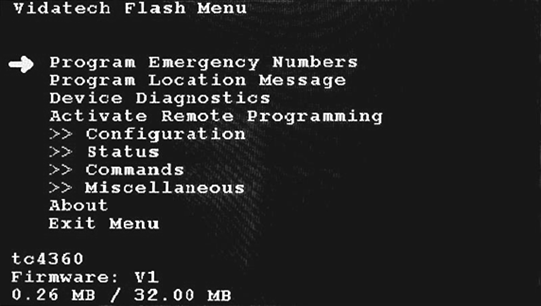
image-20260403-201700.png


Main Menu Page

To access the Menu: Press Enter when in sleep mode (at the back of the display)

ENTER Button: Select

LEFT/RIGHT Button : Change Arrow position or change selection

image-20260403-202030.png


VOIP Status Menu

Select “Status” on the main Menu

Then Select “VOIP Status”

Validate that you have 2 accounts. One indicated “Public” and one “Private”. Validate that they are marked register.

If no “Public” account found, contact technical support