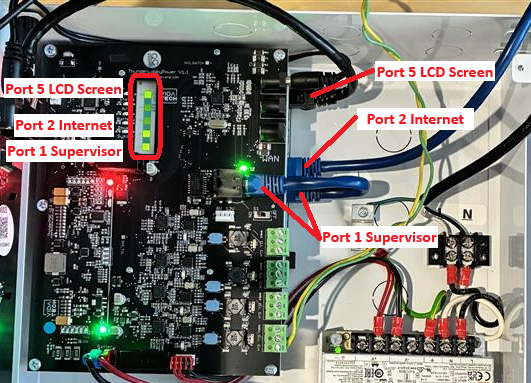
High-Rise Router — LED 1,2,5 Are Not ON
The LED state and cable connections for a High-Rise router should be as follows:
LED 1,5 ON and 2 OFF
-
Validate that the customer network is connected to Port 2.
-
Validate the customer internet connection using a laptop.
-
Validate that the customer network supports a 100 Mbps connection.
LED 1,2,5 OFF
-
Verify that the High-Rise Supervisor is ON (Troubleshoot)
-
Check the “PWR” LED located next to the router connectors.
-
If the LED is OFF:
The router has no power supply. Verify the connection between the router and the Gateway.
-
If the LED is ON:
Call Technical Support at 1-418-476-4802 and request the Router Reset procedure.